

In today’s fast-paced digital economy, the speed of your WordPress website is more important than ever for enhancing customer experience, improving search engine rankings, and increasing conversion rates. Studies show that a one-second delay in page load time can reduce conversions by 7%, and 40% of visitors abandon a site that takes more than 3 seconds to load. Moreover, Google considers site speed a key SEO ranking factor, meaning that how fast your website loads can affect your visibility in search results.
For business executives and marketing decision-makers, a slow website means lost revenue, decreased customer satisfaction, and missed growth opportunities. To avoid these setbacks, it’s essential to learn how to speed up your WordPress site and apply effective strategies to optimize its performance. This guide will walk you through the critical factors influencing site speed and provide actionable solutions to help you speed up WordPress site performance.
Table of contents
Check Your Website Speed
Regularly testing your website’s speed is essential to ensure it remains optimized as you add new content and features. Performance can fluctuate over time, so continuous monitoring helps identify issues before they affect user experience.
Tools like Google PageSpeed Insights offer actionable suggestions to improve your site’s speed and overall performance. GTmetrix provides detailed reports, including insights on page load times, total page size, and specific bottlenecks. Pingdom allows you to measure load times from different global locations, giving a broader view of how your site performs for users around the world.
By using these tools consistently, you can maintain a fast, efficient website that delivers great user experiences. In fact, the impact of UX on overall site performance can’t be overstated, as it directly influences how users interact with your site and how satisfied they are.
Reasons For A Slow-Loading Website
Many business leaders invest in digital marketing but overlook technical performance issues, such as core web vitals, which play a crucial role in site speed and user experience. Here are the most common reasons WordPress sites become slow:
Unoptimized images
Large, high-resolution images can significantly increase load times and negatively impact website performance. To resolve this issue, it’s recommended to compress images using lossless compression tools such as TinyPNG or Smush. These tools help reduce the file size of images without sacrificing quality, ensuring faster load times and improved performance for your website.
Too many or poorly coded plugins
Too many or poorly coded plugins can add extra requests to your server, increasing processing time and affecting overall website performance. To address this, it’s important to regularly audit and remove unnecessary plugins and only use lightweight, well-coded ones.
Slow web hosting
Shared hosting can lead to server overload, resulting in sluggish performance .Upgrading to a managed WordPress hosting or a dedicated VPS can help increase WordPress site speed and reliability.
Bloated themes and code
Overly complex themes with unnecessary features can slow down your website by increasing loading times. Choosing a lightweight, performance-optimized WordPress theme is a more efficient solution.
Lack of caching
Each page load typically requires multiple database queries, which can increase response time. Using caching plugins like WP Rocket or W3 Total Cache can help by serving static versions of your site, reducing the number of database queries.
Unoptimized JavaScript and CSS files
Excessive or unminified JavaScript and CSS code can add unnecessary load time. Minifying CSS, JavaScript, and HTML using tools like Autoptimize. helps streamline code and reduce loading times.
No Content Delivery Network (CDN)
For visitors from different global locations, a lack of a content delivery network (CDN) can result in longer load times. Implementing a CDN, such as Cloudflare or StackPath, allows you to deliver the content worldwide faster and improve WordPress site speed.
External scripts and ads
Embedding social media feeds, videos, and third-party ads increases HTTP requests, which can slow down your site. Limiting external scripts and only using essential embedded content can help maintain faster loading times.
Database clutter
Over time, databases accumulate unnecessary revisions and junk data, which can cause slowdowns. Optimizing your database with tools like WP-Optimize helps maintain a cleaner, faster database.
How To Speed up WordPress Site
A fast-loading website is essential for a positive user experience and better search engine rankings. Several factors, such as hosting, image optimization, and caching, play a role in improving site speed. To make your website perform at its best, it’s helpful to conduct a website audit to pinpoint issues. Here are some simple steps to speed up your WordPress site:
1. Choose high-performance hosting
Investing in a premium web host is essential for building a fast and reliable website. When choosing a hosting provider, prioritize features like SSD storage, which ensures faster data retrieval and improved loading times. A high uptime guarantee is also crucial to keep your website accessible to users around the clock. Additionally, built-in caching solutions can significantly enhance performance by reducing server load and speeding up page delivery. If you’re looking for professional assistance with website performance, consider website design and development services.
2. Optimize your images
To improve your website’s speed and performance, convert images to next-gen formats like WebP. These formats offer superior compression and quality, helping reduce file sizes without compromising visual appeal. Smaller image files load faster, which enhances user experience and can positively impact search engine rankings.
Another effective strategy is implementing lazy loading for images. This technique ensures that images are only loaded when they become visible on the user’s screen, rather than all at once when the page loads. Lazy loading reduces initial page load time and saves bandwidth, especially for users on slower connections or mobile devices. For more insights into optimizing your website’s overall performance and ensuring it is designed efficiently, check out the guide to web design and development.
3. Use a caching plugin
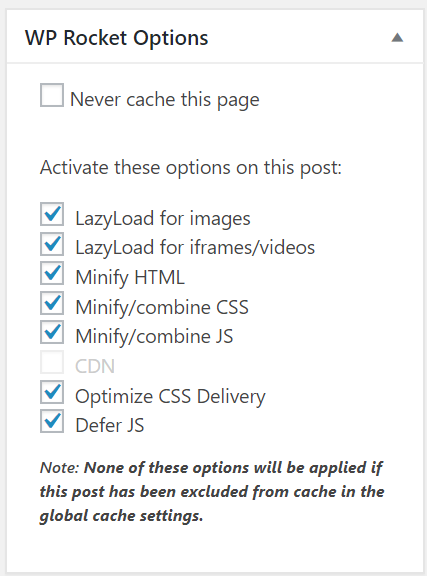
Caching plugins store static versions of your site, which helps reduce the time it takes to load pages. Some of the best options include WP Rocket, a premium plugin, W3 Total Cache, a free option, and LiteSpeed Cache, which is designed specifically for LiteSpeed servers.
4. Implement a Content Delivery Network (CDN)
A CDN distributes website content across multiple servers worldwide, helping to reduce latency. Popular options include Cloudflare, which offers both free and premium plans, as well as StackPath and KeyCDN.
5. Reduce HTTP requests
To enhance website speed and reduce unnecessary load, it’s important to minimize the use of external scripts such as Google Fonts, social media feeds, and tracking codes. While these elements can add functionality and design appeal, too many external requests slow down page loading times. Use only essential scripts and consider hosting fonts locally to cut down on external calls.
Additionally, consolidating CSS and JavaScript files through minification tools is a key step in optimizing performance. Minification removes unnecessary characters like spaces and comments from code, significantly reducing file sizes. Combining multiple CSS and JavaScript files into fewer files also decreases the number of HTTP requests, resulting in faster and smoother website performance.
6. Optimize your WordPress database
Regularly cleaning up your website’s database is crucial for maintaining optimal speed and performance. Start by deleting spam comments, outdated post revisions, and unnecessary transient options that accumulate over time. These elements can bloat the database, slowing down queries and affecting overall site efficiency.
To simplify this process, consider automating database cleanup with tools like WP-Optimize. This plugin helps keep your database lean by automatically removing unnecessary data, optimizing database tables, and improving website speed without manual intervention. Regular cleanups ensure that your site runs smoothly and efficiently as it grows.
7. Limit redirects
Each redirect on your website adds extra HTTP requests, which can slow down loading times and negatively affect user experience. To maintain a fast website, it’s important to regularly audit and remove any unnecessary redirects that no longer serve a purpose.
Additionally, having an efficient URL structure helps minimize the need for redirects in the first place. Use clear, straightforward URLs that don’t require frequent changes, and ensure internal links point directly to the final destination to avoid redirect chains. Keeping redirects to a minimum ensures smoother navigation and faster page loads.
8. Use a lightweight WordPress theme
Avoiding bulky, feature-heavy themes is essential for maintaining a fast and responsive website. Instead, opt for lightweight and well-optimized themes like GeneratePress or Astra, both known for their speed, clean code, and flexibility without unnecessary bloat. These themes provide a solid foundation for customization while keeping performance in mind.
For more business-focused designs, StudioPress themes built on the Genesis Framework are a great choice. They offer secure, SEO-friendly, and fast-loading designs ideal for professional websites. Choosing an optimized theme ensures better load times, improved user experience, and easier maintenance over time.
9. Enable Gzip compression
Gzip compression is an effective way to reduce the size of your website files, making them quicker to load and improving overall site performance. By compressing elements like HTML, CSS, and JavaScript, Gzip helps minimize the amount of data transferred between your server and the user’s browser, resulting in faster page loading times.
You can easily enable Gzip compression using plugins like Enable Gzip Compression, which handles the setup automatically. Alternatively, for more control, you can configure Gzip manually via your site’s .htaccess file. Implementing Gzip compression is a simple yet powerful step toward a faster and more efficient website.
10. Prioritize mobile performance
Google now ranks websites using mobile-first indexing, which means your site’s mobile performance directly impacts its search rankings. To stay competitive, your website must load quickly and function smoothly on smartphones and other mobile devices.
Start by using responsive themes that automatically adjust to different screen sizes, ensuring a seamless experience for all users. Additionally, regularly test your site using Google’s Mobile-Friendly Test to identify and fix any mobile usability issues. Prioritizing mobile optimization not only improves user experience but also boosts your visibility in search results.
The Business Case for Speed up WordPress Site
A fast-loading WordPress website improves:
- Customer Experience: Faster sites lead to better engagement and reduced bounce rates.
- SEO Performance: Google prioritizes speed in search rankings.
- Conversion Rates: A quicker website encourages more leads and sales.
For decision-makers, investing in website speed means higher revenue, better brand perception, and a competitive edge in digital marketing.
Conclusion
To speed up WordPress site isn’t just a technical fix—it’s a strategic business move. Executives and marketing leaders must prioritize performance optimization to enhance user experience, improve SEO, and increase conversions.
If you need guidance on how to increase website speed for WordPress or you want us to speed up your WordPress website — Reach out to us today!
Frequently Asked Questions
It’s recommended to test your WordPress site speed at least once a month or after significant updates or changes to the site (such as new plugins or themes). Regular testing helps identify and fix issues promptly, ensuring you increase WordPress site speed and maintain optimal performance.
Every HTTP request made by a browser to load a page adds to the total load time. Reducing the number of requests—by combining CSS/JS files, removing unnecessary scripts, and optimizing images—can improve WordPress site speed by reducing load times and enhancing overall site performance.
While adding new features and content is important, increasing WordPress site speed should be a priority. A fast website not only improves user experience but also enhances SEO, increases conversions, and ensures that new content is delivered quickly to visitors. Striking the right balance between features and performance is key.
Core Web Vitals are a set of performance metrics established by Google to measure user experience on the web. These include Largest Contentful Paint (LCP), First Input Delay (FID), and Cumulative Layout Shift (CLS). Optimizing these metrics is crucial for improving WordPress site speed and maintaining high search engine rankings.
Lazy loading is a technique that defers the loading of images and other media files until they are about to be displayed on the user’s screen. This reduces the initial page load time and saves bandwidth, improving the performance of your WordPress site, especially on mobile devices and slow connections.